Google Chat
for AI agents.
Google Chat integration for AI agents with secure authentication and server-side credential injection. Open Connector runs the OAuth, seals the token in an encrypted vault, and serves Google Chat tools to your agent over MCP or a typed API — credentials injected server-side, every call audited, nothing leaving your infrastructure. Open source (AGPL-3.0) and self-hostable.
Real Google Chat actions, managed and audited.
Your user connects Google Chat once; your agent can then post and update messages in spaces, create spaces with members, and add reactions to messages — scoped to the OAuth permissions you grant and the tool allowlist you configure. Every action is least-privilege and written to a tamper-evident audit trail.
- 01Connect
Your user grants Google Chat access once (OAuth) — the token lands in the vault.
- 02Call
Your agent calls a tool over MCP or the typed API; Open Connector injects the credential server-side.
- 03Audit
Every routed call appends a hash-chained audit record — nothing leaves your infra.
Supported Google Chat tools.
Browse 29 tools in the Google Chat catalog. Each action uses your configured authentication and tool allowlist.
Showing 29 tools.
- Chat CustomEmojis Create
- Creates a custom emoji. Custom emojis are only available for Google Workspace accounts, and the administrator must turn custom emojis on for the organization. For more information, see [Learn about custom emojis in Google Chat](https://support.google.com/chat/answer/12800149) and [Manage custom emoji permissions](https://support.google.com/a/answer/12850085). Requires [user authentication](https://developers.google.com/workspace/chat/authenticate-authorize-chat-user) with the [authorization scope](https://developers.google.com/workspace/chat/authenticate-authorize#chat-api-scopes): - `https://www.googleapis.com/auth/chat.customemojis`
- customemojis
- Chat CustomEmojis Delete
- Deletes a custom emoji. By default, users can only delete custom emoji they created. [Emoji managers](https://support.google.com/a/answer/12850085) assigned by the administrator can delete any custom emoji in the organization. See [Learn about custom emojis in Google Chat](https://support.google.com/chat/answer/12800149). Custom emojis are only available for Google Workspace accounts, and the administrator must turn custom emojis on for the organization. For more information, see [Learn about custom emojis in Google Chat](https://support.google.com/chat/answer/12800149) and [Manage custom emoji permissions](https://support.google.com/a/answer/12850085). Requires [user authentication](https://developers.google.com/workspace/chat/authenticate-authorize-chat-user) with the [authorization scope](https://developers.google.com/workspace/chat/authenticate-authorize#chat-api-scopes): - `https://www.googleapis.com/auth/chat.customemojis`
- customemojis
- Chat CustomEmojis Get
- Returns details about a custom emoji. Custom emojis are only available for Google Workspace accounts, and the administrator must turn custom emojis on for the organization. For more information, see [Learn about custom emojis in Google Chat](https://support.google.com/chat/answer/12800149) and [Manage custom emoji permissions](https://support.google.com/a/answer/12850085). Requires [user authentication](https://developers.google.com/workspace/chat/authenticate-authorize-chat-user) with one of the following [authorization scopes](https://developers.google.com/workspace/chat/authenticate-authorize#chat-api-scopes): - `https://www.googleapis.com/auth/chat.customemojis.readonly` - `https://www.googleapis.com/auth/chat.customemojis`
- customemojis
- Chat CustomEmojis List
- Lists custom emojis visible to the authenticated user. Custom emojis are only available for Google Workspace accounts, and the administrator must turn custom emojis on for the organization. For more information, see [Learn about custom emojis in Google Chat](https://support.google.com/chat/answer/12800149) and [Manage custom emoji permissions](https://support.google.com/a/answer/12850085). Requires [user authentication](https://developers.google.com/workspace/chat/authenticate-authorize-chat-user) with one of the following [authorization scopes](https://developers.google.com/workspace/chat/authenticate-authorize#chat-api-scopes): - `https://www.googleapis.com/auth/chat.customemojis.readonly` - `https://www.googleapis.com/auth/chat.customemojis`
- customemojis
- Chat Media Download
- Downloads media. Download is supported on the URI `/v1/media/{+name}?alt=media`.
- media
- Chat Media Upload
- Uploads an attachment. For an example, see [Upload media as a file attachment](https://developers.google.com/workspace/chat/upload-media-attachments). Requires user [authentication](https://developers.google.com/workspace/chat/authenticate-authorize-chat-user) with one of the following [authorization scopes](https://developers.google.com/workspace/chat/authenticate-authorize#chat-api-scopes): - `https://www.googleapis.com/auth/chat.messages.create` - `https://www.googleapis.com/auth/chat.messages` - `https://www.googleapis.com/auth/chat.import` (import mode spaces only) You can upload attachments up to 200 MB. Certain file types aren't supported. For details, see [File types blocked by Google Chat](https://support.google.com/chat/answer/7651457?&co=GENIE.Platform%3DDesktop#File%20types%20blocked%20in%20Google%20Chat).
- media
- Chat Spaces Create
- Creates a space. Can be used to create a named space, or a group chat in `Import mode`. For an example, see [Create a space](https://developers.google.com/workspace/chat/create-spaces). Supports the following types of [authentication](https://developers.google.com/workspace/chat/authenticate-authorize): - [App authentication](https://developers.google.com/workspace/chat/authenticate-authorize-chat-app) with [administrator approval](https://support.google.com/a?p=chat-app-auth) and one of the following authorization scopes: - `https://www.googleapis.com/auth/chat.app.spaces.create` - `https://www.googleapis.com/auth/chat.app.spaces` - [User authentication](https://developers.google.com/workspace/chat/authenticate-authorize-chat-user) with one of the following authorization scopes: - `https://www.googleapis.com/auth/chat.spaces.create` - `https://www.googleapis.com/auth/chat.spaces` - `https://www.googleapis.com/auth/chat.import` (import mode spaces only) When authenticating as an app, the `space.customer` field must be set in the request. When authenticating as an app, the Chat app is added as a member of the space. However, unlike human authentication, the Chat app is not added as a space manager. By default, the Chat app can be removed from the space by all space members. To allow only space managers to remove the app from a space, set `space.permission_settings.manage_apps` to `managers_allowed`. Space membership upon creation depends on whether the space is created in `Import mode`: * **Import mode:** No members are created. * **All other modes:** The calling user is added as a member. This is: * The app itself when using app authentication. * The human user when using user authentication. If you receive the error message `ALREADY_EXISTS` when creating a space, try a different `displayName`. An existing space within the Google Workspace organization might already use this display name.
- spaces
- Chat Spaces FindDirectMessage
- Returns the existing direct message with the specified user. If no direct message space is found, returns a `404 NOT_FOUND` error. For an example, see [Find a direct message](/chat/api/guides/v1/spaces/find-direct-message). With [app authentication](https://developers.google.com/workspace/chat/authenticate-authorize-chat-app), returns the direct message space between the specified user and the calling Chat app. With [user authentication](https://developers.google.com/workspace/chat/authenticate-authorize-chat-user), returns the direct message space between the specified user and the authenticated user. Supports the following types of [authentication](https://developers.google.com/workspace/chat/authenticate-authorize): - [App authentication](https://developers.google.com/workspace/chat/authenticate-authorize-chat-app) with the authorization scope: - `https://www.googleapis.com/auth/chat.bot` - [User authentication](https://developers.google.com/workspace/chat/authenticate-authorize-chat-user) with one of the following authorization scopes: - `https://www.googleapis.com/auth/chat.spaces.readonly` - `https://www.googleapis.com/auth/chat.spaces`
- spaces
- Chat Spaces FindGroupChats
- Returns all spaces with `spaceType == GROUP_CHAT`, whose human memberships contain exactly the calling user, and the users specified in `FindGroupChatsRequest.users`. Only members that have joined the conversation are supported. For an example, see [Find group chats](https://developers.google.com/workspace/chat/find-group-chats). If the calling user blocks, or is blocked by, some users, and no spaces with the entire specified set of users are found, this method returns spaces that don't include the blocked or blocking users. The specified set of users must contain only human (non-app) memberships. A request that contains non-human users doesn't return any spaces. Requires [user authentication](https://developers.google.com/workspace/chat/authenticate-authorize-chat-user) with one of the following [authorization scopes](https://developers.google.com/workspace/chat/authenticate-authorize#chat-api-scopes): - `https://www.googleapis.com/auth/chat.memberships.readonly` - `https://www.googleapis.com/auth/chat.memberships`
- spaces
- Chat Spaces List
- Lists spaces the caller is a member of. Group chats and DMs aren't listed until the first message is sent. For an example, see [List spaces](https://developers.google.com/workspace/chat/list-spaces). Supports the following types of [authentication](https://developers.google.com/workspace/chat/authenticate-authorize): - [App authentication](https://developers.google.com/workspace/chat/authenticate-authorize-chat-app) with the authorization scope: - `https://www.googleapis.com/auth/chat.bot` - [User authentication](https://developers.google.com/workspace/chat/authenticate-authorize-chat-user) with one of the following authorization scopes: - `https://www.googleapis.com/auth/chat.spaces.readonly` - `https://www.googleapis.com/auth/chat.spaces` To list all named spaces by Google Workspace organization, use the [`spaces.search()`](https://developers.google.com/workspace/chat/api/reference/rest/v1/spaces/search) method using Workspace administrator privileges instead.
- spaces
- Chat Spaces Members Create
- Creates a membership for the calling Chat app, a user, or a Google Group. Creating memberships for other Chat apps isn't supported. When creating a membership, if the specified member has their auto-accept policy turned off, then they're invited, and must accept the space invitation before joining. Otherwise, creating a membership adds the member directly to the specified space. Supports the following types of [authentication](https://developers.google.com/workspace/chat/authenticate-authorize): - [App authentication](https://developers.google.com/workspace/chat/authenticate-authorize-chat-app) with [administrator approval](https://support.google.com/a?p=chat-app-auth) and the authorization scope: - `https://www.googleapis.com/auth/chat.app.memberships` - [User authentication](https://developers.google.com/workspace/chat/authenticate-authorize-chat-user) with one of the following authorization scopes: - `https://www.googleapis.com/auth/chat.memberships` - `https://www.googleapis.com/auth/chat.memberships.app` (to add the calling app to the space) - `https://www.googleapis.com/auth/chat.import` (import mode spaces only) - User authentication grants administrator privileges when an administrator account authenticates, `use_admin_access` is `true`, and the following authorization scope is used: - `https://www.googleapis.com/auth/chat.admin.memberships` App authentication is not supported for the following use cases: - Inviting users external to the Workspace organization that owns the space. - Adding a Google Group to a space. - Adding a Chat app to a space. For example usage, see: - [Invite or add a user to a space](https://developers.google.com/workspace/chat/create-members#create-user-membership). - [Invite or add a Google Group to a space](https://developers.google.com/workspace/chat/create-members#create-group-membership). - [Add the Chat app to a space](https://developers.google.com/workspace/chat/create-members#create-membership-calling-api).
- spaces
- Chat Spaces Members List
- Lists memberships in a space. For an example, see [List users and Google Chat apps in a space](https://developers.google.com/workspace/chat/list-members). Listing memberships with [app authentication](https://developers.google.com/workspace/chat/authenticate-authorize-chat-app) lists memberships in spaces that the Chat app has access to, but excludes Chat app memberships, including its own. Listing memberships with [User authentication](https://developers.google.com/workspace/chat/authenticate-authorize-chat-user) lists memberships in spaces that the authenticated user has access to. Supports the following types of [authentication](https://developers.google.com/workspace/chat/authenticate-authorize): - [App authentication](https://developers.google.com/workspace/chat/authenticate-authorize-chat-app) with one of the following authorization scopes: - `https://www.googleapis.com/auth/chat.bot` - `https://www.googleapis.com/auth/chat.app.memberships` (requires [administrator approval](https://support.google.com/a?p=chat-app-auth)) - [User authentication](https://developers.google.com/workspace/chat/authenticate-authorize-chat-user) with one of the following authorization scopes: - `https://www.googleapis.com/auth/chat.memberships.readonly` - `https://www.googleapis.com/auth/chat.memberships` - `https://www.googleapis.com/auth/chat.import` (import mode spaces only) - User authentication grants administrator privileges when an administrator account authenticates, `use_admin_access` is `true`, and one of the following authorization scopes is used: - `https://www.googleapis.com/auth/chat.admin.memberships.readonly` - `https://www.googleapis.com/auth/chat.admin.memberships`
- spaces
- Chat Spaces Members Patch
- Updates a membership. For an example, see [Update a user's membership in a space](https://developers.google.com/workspace/chat/update-members). Supports the following types of [authentication](https://developers.google.com/workspace/chat/authenticate-authorize): - [App authentication](https://developers.google.com/workspace/chat/authenticate-authorize-chat-app) with [administrator approval](https://support.google.com/a?p=chat-app-auth) and the authorization scope: - `https://www.googleapis.com/auth/chat.app.memberships` (only in spaces the app created) - [User authentication](https://developers.google.com/workspace/chat/authenticate-authorize-chat-user) with one of the following authorization scopes: - `https://www.googleapis.com/auth/chat.memberships` - `https://www.googleapis.com/auth/chat.import` (import mode spaces only) - User authentication grants administrator privileges when an administrator account authenticates, `use_admin_access` is `true`, and the following authorization scope is used: - `https://www.googleapis.com/auth/chat.admin.memberships`
- spaces
- Chat Spaces Messages Create
- Creates a message in a Google Chat space. For an example, see [Send a message](https://developers.google.com/workspace/chat/create-messages). Supports the following types of [authentication](https://developers.google.com/workspace/chat/authenticate-authorize): - [App authentication](https://developers.google.com/workspace/chat/authenticate-authorize-chat-app) with the authorization scope: - `https://www.googleapis.com/auth/chat.bot` - [User authentication](https://developers.google.com/workspace/chat/authenticate-authorize-chat-user) with one of the following authorization scopes: - `https://www.googleapis.com/auth/chat.messages.create` - `https://www.googleapis.com/auth/chat.messages` - `https://www.googleapis.com/auth/chat.import` (import mode spaces only) Chat attributes the message sender differently depending on the type of authentication that you use in your request. The following image shows how Chat attributes a message when you use app authentication. Chat displays the Chat app as the message sender. The content of the message can contain text (`text`), cards (`cardsV2`), and accessory widgets (`accessoryWidgets`). 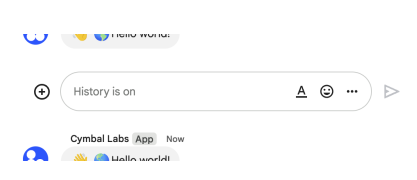 The following image shows how Chat attributes a message when you use user authentication. Chat displays the user as the message sender and attributes the Chat app to the message by displaying its name. The content of message can only contain text (`text`). 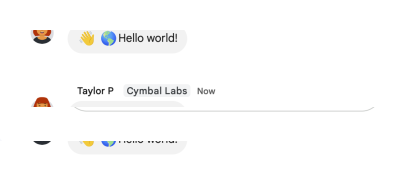 The maximum message size, including the message contents, is 32,000 bytes. For [webhook](https://developers.google.com/workspace/chat/quickstart/webhooks) requests, the response doesn't contain the full message. The response only populates the `name` and `thread.name` fields in addition to the information that was in the request.
- spaces
- Chat Spaces Messages List
- Lists messages in a space that the caller is a member of, including messages from blocked members and spaces. System messages, like those announcing new space members, aren't included. If you list messages from a space with no messages, the response is an empty object. When using a REST/HTTP interface, the response contains an empty JSON object, `{}`. For an example, see [List messages](https://developers.google.com/workspace/chat/api/guides/v1/messages/list). Supports the following types of [authentication](https://developers.google.com/workspace/chat/authenticate-authorize): - [App authentication](https://developers.google.com/workspace/chat/authenticate-authorize-chat-app) with [administrator approval](https://support.google.com/a?p=chat-app-auth) with the authorization scope: - `https://www.googleapis.com/auth/chat.app.messages.readonly`. When using this authentication scope, this method only returns public messages in a space. It doesn't include private messages. - [User authentication](https://developers.google.com/workspace/chat/authenticate-authorize-chat-user) with one of the following authorization scopes: - `https://www.googleapis.com/auth/chat.messages.readonly` - `https://www.googleapis.com/auth/chat.messages` - `https://www.googleapis.com/auth/chat.import` (import mode spaces only)
- spaces
- Chat Spaces Messages Reactions Create
- Creates a reaction and adds it to a message. For an example, see [Add a reaction to a message](https://developers.google.com/workspace/chat/create-reactions). Requires [user authentication](https://developers.google.com/workspace/chat/authenticate-authorize-chat-user) with one of the following [authorization scopes](https://developers.google.com/workspace/chat/authenticate-authorize#chat-api-scopes): - `https://www.googleapis.com/auth/chat.messages.reactions.create` - `https://www.googleapis.com/auth/chat.messages.reactions` - `https://www.googleapis.com/auth/chat.messages` - `https://www.googleapis.com/auth/chat.import` (import mode spaces only)
- spaces
- Chat Spaces Messages Reactions List
- Lists reactions to a message. For an example, see [List reactions for a message](https://developers.google.com/workspace/chat/list-reactions). Requires [user authentication](https://developers.google.com/workspace/chat/authenticate-authorize-chat-user) with one of the following [authorization scopes](https://developers.google.com/workspace/chat/authenticate-authorize#chat-api-scopes): - `https://www.googleapis.com/auth/chat.messages.reactions.readonly` - `https://www.googleapis.com/auth/chat.messages.reactions` - `https://www.googleapis.com/auth/chat.messages.readonly` - `https://www.googleapis.com/auth/chat.messages`
- spaces
- Chat Spaces Messages Update
- Updates a message. There's a difference between the `patch` and `update` methods. The `patch` method uses a `patch` request while the `update` method uses a `put` request. We recommend using the `patch` method. For an example, see [Update a message](https://developers.google.com/workspace/chat/update-messages). Supports the following types of [authentication](https://developers.google.com/workspace/chat/authenticate-authorize): - [App authentication](https://developers.google.com/workspace/chat/authenticate-authorize-chat-app) with the authorization scope: - `https://www.googleapis.com/auth/chat.bot` - [User authentication](https://developers.google.com/workspace/chat/authenticate-authorize-chat-user) with one of the following authorization scopes: - `https://www.googleapis.com/auth/chat.messages` - `https://www.googleapis.com/auth/chat.import` (import mode spaces only) When using app authentication, requests can only update messages created by the calling Chat app.
- spaces
- Chat Spaces Search
- Returns a list of spaces in a Google Workspace organization. For an example, see [Search for and manage spaces](https://developers.google.com/workspace/chat/search-manage-admin). When `use_admin_access` is set to `false`, the results are limited to spaces where the calling user is a joined member. To search with administrator privileges, set `use_admin_access` to `true`. Setting `use_admin_access` to `false` is available under Developer Preview. Supports the following types of [authentication](https://developers.google.com/workspace/chat/authenticate-authorize): - [User authentication](https://developers.google.com/workspace/chat/authenticate-authorize-chat-user) with one of the following authorization scopes: - `https://www.googleapis.com/auth/chat.spaces.readonly` - `https://www.googleapis.com/auth/chat.spaces` - [User authentication with administrator privileges](https://developers.google.com/workspace/chat/authenticate-authorize-chat-user#admin-privileges) and one of the following [authorization scopes](https://developers.google.com/workspace/chat/authenticate-authorize#chat-api-scopes): - `https://www.googleapis.com/auth/chat.admin.spaces.readonly` - `https://www.googleapis.com/auth/chat.admin.spaces`
- spaces
- Chat Spaces Setup
- Creates a space and adds specified users to it. The calling user is automatically added to the space, and shouldn't be specified as a membership in the request. For an example, see [Set up a space with initial members](https://developers.google.com/workspace/chat/set-up-spaces). To specify the human members to add, add memberships with the appropriate `membership.member.name`. To add a human user, use `users/{user}`, where `{user}` can be the email address for the user. For users in the same Workspace organization `{user}` can also be the `id` for the person from the People API, or the `id` for the user in the Directory API. For example, if the People API Person profile ID for `user@example.com` is `123456789`, you can add the user to the space by setting the `membership.member.name` to `users/user@example.com` or `users/123456789`. To specify the Google groups to add, add memberships with the appropriate `membership.group_member.name`. To add or invite a Google group, use `groups/{group}`, where `{group}` is the `id` for the group from the Cloud Identity Groups API. For example, you can use [Cloud Identity Groups lookup API](https://cloud.google.com/identity/docs/reference/rest/v1/groups/lookup) to retrieve the ID `123456789` for group email `group@example.com`, then you can add the group to the space by setting the `membership.group_member.name` to `groups/123456789`. Group email is not supported, and Google groups can only be added as members in named spaces. For a named space or group chat, if the caller blocks, or is blocked by some members, or doesn't have permission to add some members, then those members aren't added to the created space. To create a direct message (DM) between the calling user and another human user, specify exactly one membership to represent the human user. If one user blocks the other, the request fails and the DM isn't created. To create a DM between the calling user and the calling app, set `Space.singleUserBotDm` to `true` and don't specify any memberships. You can only use this method to set up a DM with the calling app. To add the calling app as a member of a space or an existing DM between two human users, see [Invite or add a user or app to a space](https://developers.google.com/workspace/chat/create-members). If a DM already exists between two users, even when one user blocks the other at the time a request is made, then the existing DM is returned. Spaces with threaded replies aren't supported. If you receive the error message `ALREADY_EXISTS` when setting up a space, try a different `displayName`. An existing space within the Google Workspace organization might already use this display name. Requires [user authentication](https://developers.google.com/workspace/chat/authenticate-authorize-chat-user) with one of the following [authorization scopes](https://developers.google.com/workspace/chat/authenticate-authorize#chat-api-scopes): - `https://www.googleapis.com/auth/chat.spaces.create` - `https://www.googleapis.com/auth/chat.spaces`
- spaces
- Chat Spaces SpaceEvents List
- Lists events from a Google Chat space. For each event, the [payload](https://developers.google.com/workspace/chat/api/reference/rest/v1/spaces.spaceEvents#SpaceEvent.FIELDS.oneof_payload) contains the most recent version of the Chat resource. For example, if you list events about new space members, the server returns `Membership` resources that contain the latest membership details. If new members were removed during the requested period, the event payload contains an empty `Membership` resource. Supports the following types of [authentication](https://developers.google.com/workspace/chat/authenticate-authorize) with an [authorization scope](https://developers.google.com/workspace/chat/authenticate-authorize#chat-api-scopes) appropriate for reading the requested data: - [App authentication](https://developers.google.com/workspace/chat/authenticate-authorize-chat-app) with [administrator approval](https://support.google.com/a?p=chat-app-auth) with one of the following authorization scopes: - `https://www.googleapis.com/auth/chat.app.spaces` - `https://www.googleapis.com/auth/chat.app.spaces.readonly` - `https://www.googleapis.com/auth/chat.app.messages.readonly` - `https://www.googleapis.com/auth/chat.app.memberships` - `https://www.googleapis.com/auth/chat.app.memberships.readonly` - [User authentication](https://developers.google.com/workspace/chat/authenticate-authorize-chat-user) with one of the following authorization scopes: - `https://www.googleapis.com/auth/chat.spaces.readonly` - `https://www.googleapis.com/auth/chat.spaces` - `https://www.googleapis.com/auth/chat.messages.readonly` - `https://www.googleapis.com/auth/chat.messages` - `https://www.googleapis.com/auth/chat.messages.reactions.readonly` - `https://www.googleapis.com/auth/chat.messages.reactions` - `https://www.googleapis.com/auth/chat.memberships.readonly` - `https://www.googleapis.com/auth/chat.memberships` To list events, the authenticated caller must be a member of the space. For an example, see [List events from a Google Chat space](https://developers.google.com/workspace/chat/list-space-events).
- spaces
- Chat Users Availability MarkAsActive
- Marks user as `ACTIVE` in Google Chat. Sets the user's availability state to `ACTIVE`. The `ACTIVE` state lasts until the specified expiration, at which point the user's state becomes `AWAY`. Note that if the user is actively using Chat, the `ACTIVE` state duration may extend beyond the provided expiration. This method only updates the authenticated user's availability. Requires [user authentication](https://developers.google.com/workspace/chat/authenticate-authorize-chat-user) with [authorization scope](https://developers.google.com/workspace/chat/authenticate-authorize#chat-api-scopes): - `https://www.googleapis.com/auth/chat.users.availability`
- users
- Chat Users Availability MarkAsAway
- Marks user as `AWAY` in Google Chat. Sets the user's state to away and is not affected by the user's activity. This method only updates the authenticated user's availability. Requires [user authentication](https://developers.google.com/workspace/chat/authenticate-authorize-chat-user) with [authorization scope](https://developers.google.com/workspace/chat/authenticate-authorize#chat-api-scopes): - `https://www.googleapis.com/auth/chat.users.availability`
- users
- Chat Users Availability MarkAsDoNotDisturb
- Marks user as `DO_NOT_DISTURB` in Google Chat. Sets a user's availability state to `DO_NOT_DISTURB` until a specified expiration time. When in `DO_NOT_DISTURB`, users typically won't receive notifications. This method only updates the authenticated user's availability. Requires [user authentication](https://developers.google.com/workspace/chat/authenticate-authorize-chat-user) with [authorization scope](https://developers.google.com/workspace/chat/authenticate-authorize#chat-api-scopes): - `https://www.googleapis.com/auth/chat.users.availability`
- users
- Chat Users Sections Create
- Creates a section in Google Chat. Sections help users group conversations and customize the list of spaces displayed in Chat navigation panel. Only sections of type `CUSTOM_SECTION` can be created. For details, see [Create and organize sections in Google Chat](https://support.google.com/chat/answer/16059854). Requires [user authentication](https://developers.google.com/workspace/chat/authenticate-authorize-chat-user) with the [authorization scope](https://developers.google.com/workspace/chat/authenticate-authorize#chat-api-scopes): - `https://www.googleapis.com/auth/chat.users.sections`
- users
- Chat Users Sections Items List
- Lists items in a section. Only spaces can be section items. For details, see [Create and organize sections in Google Chat](https://support.google.com/chat/answer/16059854). Requires [user authentication](https://developers.google.com/workspace/chat/authenticate-authorize-chat-user) with the [authorization scope](https://developers.google.com/workspace/chat/authenticate-authorize#chat-api-scopes): - `https://www.googleapis.com/auth/chat.users.sections` - `https://www.googleapis.com/auth/chat.users.sections.readonly`
- users
- Chat Users Sections Items Move
- Moves an item from one section to another. For example, if a section contains spaces, this method can be used to move a space to a different section. For details, see [Create and organize sections in Google Chat](https://support.google.com/chat/answer/16059854). Requires [user authentication](https://developers.google.com/workspace/chat/authenticate-authorize-chat-user) with the [authorization scope](https://developers.google.com/workspace/chat/authenticate-authorize#chat-api-scopes): - `https://www.googleapis.com/auth/chat.users.sections`
- users
- Chat Users Sections List
- Lists sections available to the Chat user. Sections help users group their conversations and customize the list of spaces displayed in Chat navigation panel. For details, see [Create and organize sections in Google Chat](https://support.google.com/chat/answer/16059854). Requires [user authentication](https://developers.google.com/workspace/chat/authenticate-authorize-chat-user) with the [authorization scope](https://developers.google.com/workspace/chat/authenticate-authorize#chat-api-scopes): - `https://www.googleapis.com/auth/chat.users.sections` - `https://www.googleapis.com/auth/chat.users.sections.readonly`
- users
- Chat Users Sections Position
- Changes the sort order of a section. For details, see [Create and organize sections in Google Chat](https://support.google.com/chat/answer/16059854). Requires [user authentication](https://developers.google.com/workspace/chat/authenticate-authorize-chat-user) with the [authorization scope](https://developers.google.com/workspace/chat/authenticate-authorize#chat-api-scopes): - `https://www.googleapis.com/auth/chat.users.sections`
- users
Google Chat integration, answered
- How do AI agents use Google Chat through Open Connector?
- Your user connects Google Chat once with one of its cataloged authentication methods. Open Connector stores the credential in an encrypted vault and exposes Google Chat tools to your agent over MCP or a typed API, with credentials injected server-side on each call.
- Is this a Google Chat MCP server?
- Yes. Open Connector can serve Google Chat as a named MCP server with a scoped allowlist and a per-user connection URL, so any MCP client can call Google Chat actions with credentials injected server-side.
- Where do Google Chat credentials live?
- In your own infrastructure. Open Connector keeps credentials in its own vault and injects them at call time, so they never leave your environment.
Give your agents Google Chat — keep the keys.
Open source, self-hostable, with Google Chat credentials that never leave your infrastructure. Run it from source today.